Showing posts with label Soni1010. Show all posts

Easy steps to create Requirement Traceability Matrix (RTM)

A Traceability Matrix is a document that co-relates any two-baseline documents that require a many-to-many relationship to check the completeness of the relationship.
It is used to track the requirements and to check the current project requirements are met.


Advantages of Requirement Traceability Matrix (RTM):
  1. Gives Overview of ALL the requirements
  2. Shows how requirements are linked to Test Cases
  3. Makes sure 100% coverage of requirements
  4. Easy to prepare
  5. No special tool is required

How to prepare Requirement Traceability Matrix (RTM):
  1. Get all available requirement documents. For eg. Business Requirement Document(BRD), Functional Requirement Document(FSD), Technical Requirement Document(TSD)
  2. First list down All the requirements from BRD one by one with requirement ID#
  3. Now go to FSD, and list all respective functional requirements for each Business Requirements
  4. Open Test Scenario or Test Case document and link available TC IDs to respective Functional Requirements
Let’s take an example:

Business Requirement Document (BRD) :


This document is provided by the Client with high-level business Requirements. Suppose for Flight Booking Application it shows below 2 requirements
BR_1  Reservation Module :
It should allow the user to book one or more tickets, one way or a round way for future dates
BR_2  Payment Module:
User should able to make payment for booked tickets via Credit / Debit Card or through Reward Points

Functional Specification Document (FSD) :

This document is prepared by the Technical team which further elaborate business requirements into functional requirements that can be implemented in software.
Suppose above 2 business requirements in BRD have more detailed functional requirements:
BR_1  Reservation Module :
  • FR_1 : One Way Ticket booking
    • It should allow user to book one-way ticket
  • FR_2 : Round Way Ticket
    • It should allow user to book round way ticket
  • FR_3: Multicity Ticket booking
    • It should allow user to book one way or round way ticket for multiple cities
BR_2  Payment Module:
  • FR_4: By Credit Card
    • It should allow user to make payment by Credit Cards
  • FR_5 By Debit Card
    • It should allow user to make payment by Debit Cards
  • FR_6 By Reward Points
    • It should allow user to make payment by Reward Points

And you have written some test cases or test scenarios for each functional requirement.
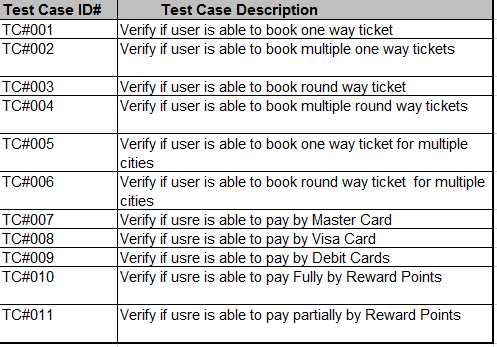
   
So if we prepare simple Requirements Traceability Matrix (RTM) for the above example it would like as below:
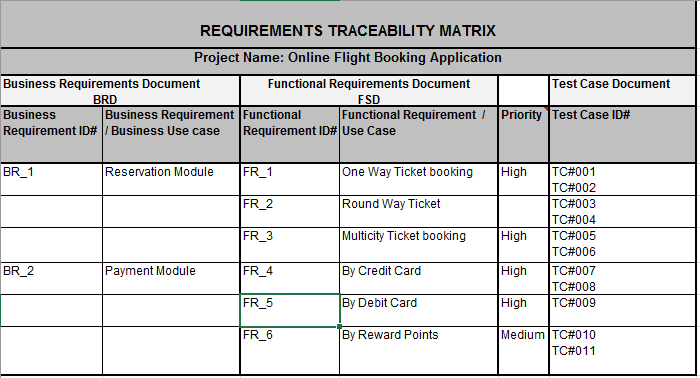
Requarements Treaceability Matrix
You can also add Execution Status and Defects columns in RTM to view the overall status of all requirements along with Test Cases.

World’s most desirable Test Automation skills!

                                
                                 Most Desirable Test Automation skills!

In order to answer the question – “What are the most desirable test automation skills in the upcoming year of 2016?”, our research team took over the top job searching websites around the globe looking for the most popular and required technologies in the test automation field.
Most popular test automation frameworksMost popular test automation frameworks
Selenium is considered to be the world’s most popular framework. The most surprising fact regarding Selenium in the United States is that it’s almost 300% more demanded than QTP/UTF which has made to the second place. This huge gap practically renders all the other technologies as less relevant for people looking to learn a new automation framework.
The broad use of Cucumber and the fact that Behavior-Driven Development (BDD) and testing has become one of the promising technologies in Europe influence the rising popularity of the Ruby programming language. As can be seen in the graph above, Ruby for test automation has become the second most popular language in Europe, and the third most popular in the US.
We can summarize by saying that in case you are looking for test automation position in Europe, Cucumber Ruby may be the right buzzwords in your resume.
If your destination is India; Selenium or a premium solution such as QTP or Microsoft testing tools (Coded UI/Unit Testing) will most likely improve your chances in finding a job in the test automation field.
World’s test automation programming languages distribution
Most popular test automation programing languages in the world
In case you are debating on whether to acquire Java programming skills to improve your chances for sitting behind an interview desk, you probably on the right path. The combination of Java and Selenium are so far considered the most popular for test automation in the world.
The broad use of Python in test automation is already well known, yet our research reveals that Python is highly popular when used for internally developed tools.  This and the fact that it’s broadly used with Selenium contributes to its continuous and rapid growth in the US and Europe in specific.
Finally, if it hasn’t been clear so far, SQL is a very useful asset for all QA engineers.  SQL validation queries are very common and complementary to automated test scenarios, as it's broadly used with any of the existing programming languages.
Demand for mobile test automation experts Mobile test automation demand worldwide
The demand for mobile test automation experts is higher in the US compared to India, which is considered as very much lean in mobile skills demand for test automation compared to the rest of the world.
While discussing mobile technologies, acquiring test automation skills for iOS considered a must-have skill, while Android isn’t too far behind.  Therefore, we recommend targeting both technologies in order to increase your chances in finding a job in the mobile test automation field. You may refer to popular tools drill down here: Open Source Tools for Mobile App Test Automation’.
Operation Systems DistributionTest Automation for operation systems
Currently, the need for Linux automation experts is similar to Windows and continues to grow in the world of test automation across the globe, as also reflected in the growth of use in cross-platform programming languages such as (Java, Python, Ruby, etc). In any case, acquiring “advanced user” skills with Linux based distributions is necessary.
In addition, it is interesting to see the almost equal segmentation between desktop and mobile OSes (Linux<->Windows/ iOS<->Android). This trend may very much show that smartphone – mobile world is taking over the world.


#Reading #Writing #Learning #Skills #to #upgrate #recommend #to #change 
#Automation #Tesing #Automate #The #Manual #Efforts 
#Soni10.10 #hsoni2010 #harry #soni1010 #QualityEngineer 

9 Most Popular Defect Tracking Tools [Issue Tracking Tools]

Popular Defect Tracking Tools

Defect tracking tools are applications which help us to record, report and monitor the bugs in a software development project. Before looking into the popular defect tracking tools list, I would like to raise some questions. Are you working in a company where excel sheets are using to track the defects? I don’t say using excel is not a good way of tracking bugs but why could not we try issue tracking tools, when we have best alternative open source tools. Everything in an organization is related to ROI (return on investment). So, most of the start-ups don’t invest on defect tracking tools and they simply use excel sheets to move on. Are you using any tool for tracking bugs? Is the tool you are using available in the below list else let us know the tool which you are using and we will include it in our list.

You are a part of your organization. Why could not you suggest one defect tracking tool to your team from the list below? A good tool helps your team get organized and communicate effectively.

List of Popular Defect Tracking Tools:

I am listing both free bug tracking tools and commercial bug tracking tools. Commercial tools have free trails too. Using free trial you could play around before choosing a commercial tool.

BUGZILLA:

Bugzilla Defect Tracking Tool
Bugzilla is an open source web-based bug tracking tool developed by Mozilla. It is one of the leading bug tracking tools used by many organizations.
It provides lots of features such as Advanced search capabilities, Email notifications, Scheduled Reports (Daily, Weekly, Hourly, etc.) by Email, Reports and Charts, Automatic Duplicate Bug Detection, File/Modify Bugs By Email, Time Tracking, Request System, Private Attachments and Comments and much more.

HP ALM:

HP ALM Defect Tracking Tool
HP ALM is an application management solution to help you to define, build, test, and deliver applications fast and with confidence across the entire Software Development Life Cycle (SDLC). It’s a premium tool and has a free trial.
Type: Commercial and free trial availableClick here to download.

JIRA (developed by Atlassian):

JIRA Defect Tracking Tool
According to Atlassian, JIRA is used for issue tracking and project management by over 50,000 customers. Companies like Twitter, Nasa, Audi, The Telegraph, and much more are using JIRA Software. Why still thinking, give a try. It is a commercial tool and it provides a free trial.
Type: Commercial and free trial availableClick here to download.

Mantis:

Mantis Defect Tracking Tool
MantisBT is an open source web-based issue tracking tool. It also provides a mobile version. Users are able to get started in minutes to manage their projects. Compatible with Chrome, Firefox, Safari, Opera and IE 7+. It has features like email notifications, chat, mobile version etc.,
Type: It has both Free & Commercial versions (You get 30 days free trial on commercial plans too)

Trac:

Trac Defect Tracking Tool
Trac is an open source, web-based project management, and issue tracking tool. The features include project management, bug tracking, a search engine for tickets, email notifications etc.,
Type: Free (check @ official website)Click here to download.

Redmine:

Redmine Defect Tracking Tool
Redmine is an open source, web-based project management, and issue tracking tool. Some of the main features of Redmine are multiple projects support, flexible role-based access control, flexible issue tracking system, Gantt chart, multi-language support, issue creation via email etc.,

FogBugz:

FogBugz Defect Tracking Tool
FogBugz is a web-based project management and issue tracking tool. It comes with features like a powerful search engine, issue tracking, Agile project planning, project management, support help desk, time tracking, discussion groups. Used by over 20,000 software development teams.
Type: Commercial but you get free for 2 users (on demand). Check the pricing page and confirm with the FogBugz support team if you feel to use it.

YouTrack:

YouTrack Defect Tracking Tool
YouTrack is a web-based bug tracking tool and project management software developed by JetBrains. It allows you to install on your server. It includes features like Bug & Issue Tracking, Agile boards, Reporting, Time Management.
Type: Free (Stand-alone installed on your server for 10 users) & Commercial

BugNet:

BugNet Defect Tracking Tool
BugNET is a free, open source issue tracking and project issue management solution for the ASP.NET platform.
Type: Free