String Manipulation Interview questions?

 *************************************************************************************

String concat,replace, substring, trim, lowercase, uppercase? Selenium, Automation core java interview questions?


*************************************************************************************

public class StringManipulation {

    public static void main(String[] args) {
        // Strings are immutable
        String str3 = "java";
        str3.concat("oops");
        System.out.println(str3); // java

        // The result should be assigned to a new reference variable (or same
        // variable) can be reused.
        String concat = str3.concat("value2");
        System.out.println(concat); // value1value2

        // -----------------------String methods-------------------------------------
        String str = "abcdefghijk";

        // char charAt(int paramInt)
        System.out.println(str.charAt(2)); // prints a char - c

        // String concat(String paramString)
        System.out.println(str.concat("lmn"));// abcdefghijklmn

        System.out.println("ABC".equalsIgnoreCase("abc"));// true
        System.out.println("ABCDEFGH".length());// 8

        // String replace(char paramChar1, char paramChar2)
        System.out.println("012301230123".replace('0', '4'));// 412341234123

        // String replace(CharSequence paramCharSequence1, CharSequence
        // paramCharSequence2)
        System.out.println("012301230123".replace("01", "45"));// 452345234523

        // All characters from index paramInt
        // String substring(int paramInt)
        System.out.println("abcdefghij".substring(3)); // defghij
        // 0123456789

        // All characters from index 3 to 6
        System.out.println("abcdefghij".substring(3, 7)); // defg
        // 0123456789

        System.out.println("ABCDEFGHIJ".toLowerCase()); // abcdefghij

        System.out.println("abcdefghij".toUpperCase()); // ABCDEFGHIJ

        System.out.println("abcdefghij".toString()); // abcdefghij

        // trim removes leading and trailings spaces
        System.out.println(" abcd  ".trim()); // abcd
    }
}
 

___________________________________________________________________

What we know about the "STRING"?


MCQ on String for concepts and interview preparation QAE - SDET - AUTOMATION QA 2022


1. What is the output for below?

String str1 = "test";
String str2 = "one";

String str3 = str1.concat(str2);


Ans:

a) testone

b) test

c) one

d) Let me check in IDE :)


2. What is the output for below?

String str1 = "test";
String str2 = "test";

String str3 = new String("test");


System.out.println(str1.equals(str2));

System.out.println(str1.equals(str3));


Ans:

a) true,true

b) false, true

c) false, false

d) Let me check in IDE :)


3. What is the output for below?

String str1 = "test";

String str2 = "test";

String str3 = new String("test");


System.out.println(str1==str2));

System.out.println(str1==str3);


a) true, true

b) true, false

c) false, true

d) false, false


4. What is the output for below?

String str = "test";

System.out.println(str1.charAt(2)); 


a) s

b) e

c) error

d) es


5. What is the output for below?

System.out.println("012301230123".replace(55, "45"));

 System.out.println("012301230123".replace("01""45"));


a) compile error, 452345234523

b) 452345234523, 452345234523

c) error, error

d) Let me check in IDE :)


6. What is the output for below?

System.out.println("tes".substring(3));

System.out.println("test".substring(3));


a) error, error

b) error, t

c)  , t

d) t, t


7. How many ways we can create String Object in Java?


a) String s = "abc"; String s1 = new String("abc");

b) Literal, Keyword

c)  Both A and B

d)  Not sure


8. Is String thread safe?


a) true

b) false

c) Not sure


9. What is the output for below?

String str8 = new StringBuilder("test").reverse().toString();

System.out.println(str8);


a) test

b) tset

c) Not sure


10. Which one is thread safe: StringBuffer or StringBuffer ?


a) Both

b) StringBuffer

c) StringBuilder

d) None of the options


Below are the answers for all the questions on STRING:


1. a)testone


2. a)true,true

3. b)true, false

4. a)S

5. a) compile error, 452345234523

6. c)  , t

7. c)  Both A and B

8. a) true

9. b) tset

Top 21 GIT Interview Questions and Answers for SDET - DevOps - Automation QA


How to Switch to previous branch:

Ans: git switch @{-1}

How to create repository in bitbucket and push code for automation project?
Ans: Below are the sequence of commands to use:

First go to your bitbucket path and get access to create repository.
Create a repository with a self defined name, let name is "Automaters"
Then open cmd in the laptop where you have kept your automation project
cd existing-project
git init
git add --all
git commit -m "InitialCommit"
git remote add origin "https://path....Automaters.git"
git push -u origin master

If you get SSL certificate error to push then use below:

git config --global http.sslVerify false

How to Push a local branch for the first time:
Ans: git push --set-upstream origin <branch>

How to Push a local branch to a different remote branch:
Ans: git push origin <local_branch>:<remote_branch>

How to undo commits?
AnsThe following command will undo your most recent commit and put those changes back into staging, so you don't lose any work:
$ git reset --soft HEAD~1
The next one will completely delete the commit and throw away any changes. Be absolutely sure this is what you want:
$ git reset --hard HEAD~1

Fetch changes from both origin and upstream in the same shot:
Ans: git fetch --multiple origin upstream

How to Delete a remote branch on origin:
Ans: git push origin : <remote_branch>

Difference between rebase and merge?
Ansgit merge apply all unique commits from branch A into branch B in one commit 
 git rebase gets all unique commits from both branches and applies them one by one.
 git rebase rewrites commit history but doesn't create extra commit for merging.

Unstash those changes and bring them back into your working directory
Ans: git stash pop

Difference between soft, mixed, and hard resets?
Ans: --soft: Uncommit changes but leave those changes staged
--mixed (the default): Uncommit and unstage changes, but changes are left in the working directory
--hard: Uncommit, unstage, and delete changes

Listing the existing tags in Git is straightforward
Ans: $ git tag

How to create tag?
Ans: git tag <tagname>

Command to delete the file from your working directory and stages the deletion?
Ans: git rm [fileName]

Unstash your changes without popping them off the stack.
Ans: git stash apply

How to know about the history?
git log
To know more about git log : https://git-scm.com/docs/git-log

How to know all the details of changes to a commit?
git show <commitID>
To know more about git show : https://git-scm.com/docs/git-show
 
How to know the last commit details and see a log where each commit is one line?
To know the last commit details : git log -1
see log each commit in one line: git log --pretty=oneline

What git add and git commit command does
Git add--> add the changes to index area
Git commit--> add changes to local repo

How to compare two branch in GIT?
git diff branch1...branch2

How to view current state and any merge conflits?
git status
    The git status command displays the state of the working directory and the staging area.

How to undo last commit and rewrite history?
git reset --hard HEAD~1
 
Difference between soft, mixed, and hard resets?
--soft: Uncommit changes but leave those changes staged
--mixed (the default): Uncommit and unstage changes, but changes are left in the working directory
--hard: Uncommit, unstage, and delete changes

How to reset a file back to how it was before changes?
git restore <filename>     # new syntax (as of Git 2.23)
git checkout -- <filename> # old syntax

How to unstage changes or restore files?
Maybe you accidentally staged some files which we don't want to commit.
git restore test.js
git restore .
Git Official Docs

Top 10 tech skills that are a must to hit in 2021

Required technical skills that can boost your career in 2021 and beyond.

The world of technology continues to change rapidly. The demand for professionals with advanced skills IT has never been higher.

With technology roles dominating the "best jobs" or "most in-demand" lists of the future, we're looking at some of the most in-demand tech skills of 2021 that will help increase demand in the tech market and your value as an employee.


Cybersecurity is one of the hottest technology trends in 2020 due to the importance of companies that collect customer and user information to keep their networks safe from attacks.

A The shortage of cybersecurity skills among professionals IT has created a sought-after market for those with skills in cybersecurity, information security, network security, and vulnerability assessment skills.


DevOps professionals have revolutionized the way businesses meet the growing demands of their customers and the best DevOps professionals are those that are able to work with other areas across the business.

Being able to speed up processes and development cycles all while maintaining a high degree of accuracy and not compromising on security is what talented DevOps professionals are all about.


Easy steps to create Requirement Traceability Matrix (RTM)

A Traceability Matrix is a document that co-relates any two-baseline documents that require a many-to-many relationship to check the completeness of the relationship.
It is used to track the requirements and to check the current project requirements are met.


Advantages of Requirement Traceability Matrix (RTM):
  1. Gives Overview of ALL the requirements
  2. Shows how requirements are linked to Test Cases
  3. Makes sure 100% coverage of requirements
  4. Easy to prepare
  5. No special tool is required

How to prepare Requirement Traceability Matrix (RTM):
  1. Get all available requirement documents. For eg. Business Requirement Document(BRD), Functional Requirement Document(FSD), Technical Requirement Document(TSD)
  2. First list down All the requirements from BRD one by one with requirement ID#
  3. Now go to FSD, and list all respective functional requirements for each Business Requirements
  4. Open Test Scenario or Test Case document and link available TC IDs to respective Functional Requirements
Let’s take an example:

Business Requirement Document (BRD) :


This document is provided by the Client with high-level business Requirements. Suppose for Flight Booking Application it shows below 2 requirements
BR_1  Reservation Module :
It should allow the user to book one or more tickets, one way or a round way for future dates
BR_2  Payment Module:
User should able to make payment for booked tickets via Credit / Debit Card or through Reward Points

Functional Specification Document (FSD) :

This document is prepared by the Technical team which further elaborate business requirements into functional requirements that can be implemented in software.
Suppose above 2 business requirements in BRD have more detailed functional requirements:
BR_1  Reservation Module :
  • FR_1 : One Way Ticket booking
    • It should allow user to book one-way ticket
  • FR_2 : Round Way Ticket
    • It should allow user to book round way ticket
  • FR_3: Multicity Ticket booking
    • It should allow user to book one way or round way ticket for multiple cities
BR_2  Payment Module:
  • FR_4: By Credit Card
    • It should allow user to make payment by Credit Cards
  • FR_5 By Debit Card
    • It should allow user to make payment by Debit Cards
  • FR_6 By Reward Points
    • It should allow user to make payment by Reward Points

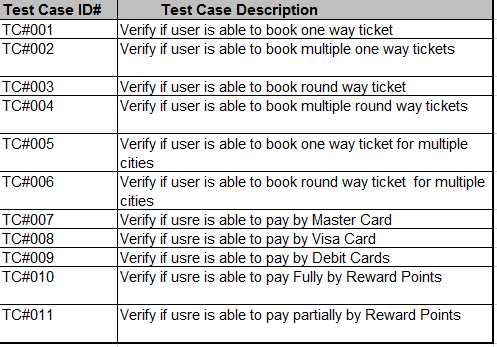
And you have written some test cases or test scenarios for each functional requirement.
   
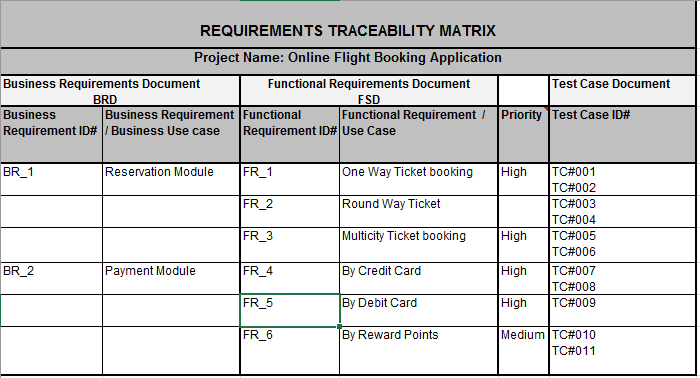
So if we prepare simple Requirements Traceability Matrix (RTM) for the above example it would like as below:
Requarements Treaceability Matrix
You can also add Execution Status and Defects columns in RTM to view the overall status of all requirements along with Test Cases.

How to download Chrome Driver for Selenium

The detailed steps on how you can download Selenium Chrome Driver.

Before we start with the download process, let us try to get some basic understanding on what chrome driver is and why do we need it.

What is chrome driver?

You know that selenium is a tool that basically interacts with browsers to test your web applications. In our previous article, we had mentioned that you can use selenium webdriver to open some url on a browser and interact with webpage elements like buttons, links, text boxes etc.
But selenium cannot do all these tasks on its own. It needs some help from the browser side as well, to perform all these tasks. So, in that sense, chrome driver is what helps selenium perform these actions on Chrome browser. In more technical terms, ChromeDriver is a standalone server which implements WebDriver’s wire protocol for Chrome.

Like chrome driver, are there more standalone servers for other browsers as well?

Yes. Just like chrome driver, there are multiple other standalone servers as well. Some popular ones are GeckoDriver for firefox, EdgeDriver for Microsoft Edge, InternerExplorerDriver for IE, SafariDriver for Safari browser and so on.
You will need to use these drivers when you want to run your automation scripts on their corresponding browsers.

Why have we selected chrome driver for this tutorial and not others?

This question can be rephrased like this – 
Why are we using chrome browser to automate our test cases? 

There are two main reasons for this:
  • Chrome has the highest market share worldwide. So, it makes sense to work on the browser which majority of the people are using. We have given below a comparison chart of different browsers.
  • Selenium works better in Chrome than other browsers, especially Firefox. When I started working on Selenium automation in 2012 Firefox was kind of the default browser to go to when people wanted to automate test scripts. But now a lot of people prefer to use chrome to write automation scripts.


Let us now check out the steps to download ChromeDriver !

Steps to download ChromeDriver

Follow the steps given below to download the latest version of chrome driver for selenium –
1. Open ChromeDriver download page – https://sites.google.com/a/chromium.org/chromedriver/downloads
2. This page contains all the versions of Selenium ChromeDriver. We are interested in the latest version of ChromeDriver, which is ChromeDriver 75.0.3770.8 (as on 04 May 2019), as shown in the below image.


3. Click on ChromeDriver 75.0.3770.8 link. You will be navigated to ChromeDriver download page which contains ChromeDriver for Mac, Windows and Linux operating systems.


4. Click on chromedriver_win32.zip to download ChromeDriver for Windows.
5. Once you download the zip file, unzip it to retrieve chromedriver.exe


#Reading #Writing #Learning #Skills #to #upgrate #recommend #to #change 
#Automation #Tesing #Automate #The #Manual #Efforts 

#Soni10.10 #hsoni2010 #harry #soni1010 #QualityEngineer